Showing posts with label Android. Show all posts
How to Instantly Translate Anything Using Your Smartphone Camera
This is one of the most amazing android tricks for your android phone. You can translate anything in your phone in Augmented reality. This is like a technology of future in your hands.
Imagine you are in a foreign country and come across a sign in a language that you are unable to read or understand. Now you have help at hand with a new App that translates foreign language road signs to your language.
![]() |
| How to Instantly Translate Anything Using Your Smartphone Camera |
How to Instantly Translate Anything Using Your Smartphone Camera
This Google translate app allows you to translate just by clicking an image with your smartphone’s camera. Download Google Translate app in your Phone and select your preferred language.
![]() |
| Google Translate |
Tap on the Camera icon and translate anything in your android phone with the help of this camera app.
![]() |
| Google Translate App |
Google Translate App Features
• Translate between 103 languages by typing
• Tap to Translate: Copy text in any app and your translation pops up
• Offline: Translate 52 languages when you have no Internet
• Instant camera translation: Use your camera to translate text instantly in 29 languages
• Camera Mode: Take pictures of text for higher-quality translations in 37 languages
• Conversation Mode: Two-way instant speech translation in 32 languages
• Handwriting: Draw characters instead of using the keyboard in 93 languages
• Phrasebook: Star and save translations for future reference in any language
Translations between the following languages are supported:
Afrikaans, Albanian, Amharic, Arabic, Armenian, Azerbaijani, Basque, Belarusian, Bengali, Bosnian, Bulgarian, Catalan, Cebuano, Chichewa, Chinese (Simplified), Chinese (Traditional), Corsican, Croatian, Czech, Danish, Dutch, English, Esperanto, Estonian, Filipino, Finnish, French, Frisian, Galician, Georgian, German, Greek, Gujarati, Haitian Creole, Hausa, Hawaiian, Hebrew, Hindi, Hmong, Hungarian, Icelandic, Igbo, Indonesian, Irish, Italian, Japanese, Javanese, Kannada, Kazakh, Khmer, Korean, Kurdish (Kurmanji), Kyrgyz, Lao, Latin, Latvian, Lithuanian, Luxembourgish, Macedonian, Malagasy, Malay, Malayalam, Maltese, Maori, Marathi, Mongolian, Myanmar (Burmese), Nepali, Norwegian, Pashto, Persian, Polish, Portuguese, Punjabi, Romanian, Russian, Samoan, Scots Gaelic, Serbian, Sesotho, Shona, Sindhi, Sinhala, Slovak, Slovenian, Somali, Spanish, Sundanese, Swahili, Swedish, Tajik, Tamil, Telugu, Thai, Turkish, Ukrainian, Urdu, Uzbek, Vietnamese, Welsh, Xhosa, Yiddish, Yoruba, Zulu
How to Instantly Translate Anything Using Your Smartphone Camera
You will see a screen like the one above when you tap the camera and it will show you what your camera sees. Point it at some words and watch them change right in front of you. Further, tap the red camera button to snap a photo, if you want to save a specific image. That’s it.
Also, you do not need an internet connection for the app to function. Since Google stores translation files locally on your phone, there is no need for you to sign up for a local data plan and download them when you travel abroad.
Where to Getting It
Google Translate is a free app available for download on iPhone and Android. To view the download page, you can click those links or can just search the app store on your iPhone or Android to get it directly on your device.
Download Google Translate app for Android Phone Here
How to run Android Apps on your Windows PC Without Bluestacks/Youwave(No Android Emulators)
![]() |
| How to run Android Apps on your Windows PC Without Bluestacks/Youwave(No Android Emulators) |
BlueStacks, YouWave, Droid4X are the Android Emulators that is top performing and is being used by millions of people to run Android Apps on their Windows PC/Laptop.
Today in this tutorial, We are not going to use any Android Emulators, All you want is a working Internet connection and a Web Browser.
1. Go to Manymo.com
2. Click on the Sign Up button
3. Now fill required details like Name, Email, Password and complete the challenge for proving you are a human being
Today in this tutorial, We are not going to use any Android Emulators, All you want is a working Internet connection and a Web Browser.
Let's Start,
1. Go to Manymo.com
2. Click on the Sign Up button
3. Now fill required details like Name, Email, Password and complete the challenge for proving you are a human being
4. Now verify your Manymo account by clicking on the activation link sent to your Email account(Used for sign up process)
5. Now Drag and Drop your specific APK file to the section provided(Check screenshot given below)
6. Wait the file to be uploaded
7. Now you will see many types of Android Screen versions there, Click one of your choices
8.Now the App will launch
9. Now use the App
7. Now you will see many types of Android Screen versions there, Click one of your choices
8.Now the App will launch
9. Now use the App
That's it, See how easily we have launched an Android App on our Windows PC/Laptop without any Android Emulators or any other third party software. Using this method you can use WhatsApp, Games, and other Android APK Based apps.
10 Best Augmented Reality Games Like Pokemon GO
Software developer company Niantic is popular for its new Pokemon GO game that was launched earlier this month in collaboration with Nintendo. In this game, you need to roam around in the real world with your smartphone to find Pokemon and capture them. That’s what augmented reality (AR) means.
AR simply means that the app or game augments reality into its functioning, which means that you can to rely on the real life to play an augmented reality game or use an AR app. But Pokemon GO is not the only augmented reality game/app that we have got, and this certainly not the first time an Android app has used AR technology.
If you have played Pokemon GO and/or are wondering if there are more such games and apps, yes there are. We have created a list of 10 best augmented reality games like Pokemon GO that you should definitely try out right now. Maybe one of those could become your favourite AR game. Let’s check out the games similar to Pokemon.
1. Ingress
This is the first augmented reality game developed by Niantic that relies on your GPS location and is one of the most similar games like Pokemon GO. Your objective is to hack portals and build them up after choosing one of the teams to fight against the other side. You must travel to the various destination in the real world to hack several portals and own them for your team. Yes, it’s working mechanism is similar to Pokemon GO, but the overall feel is different for those who want to try something new.
2. Real Strike – The Original 3D Augmented Reality FPS Gun App
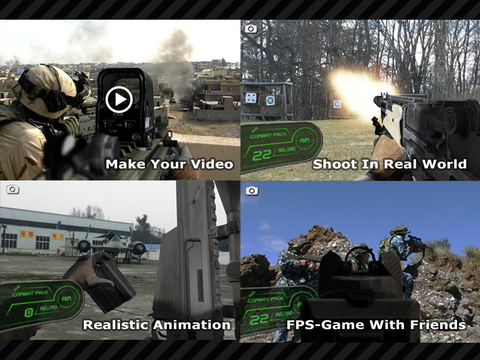
Developed by Yii International, this awesome app turns reality into a military base and brings first person shooting in the real world. It combines your real-life surroundings with 3D gun animation with 25 weapons to choose from. The firing, reloading, and animations are sensitive and cool. Combat items include night vision, thermal vision, and more. It’s an awesome game for FPS lovers, but it’s available for iOS only.
3. Life is Crime
Unlike Ingress or any other light and fun games like Pokemon GO, Life is Crime is based a slightly more real-like concept of gangs and criminals, and those who love watching villains will love it. In this game, players can join gangs of their choice and can have live chats with fellow players. You can fight with other gangs to win territories and complete tasks for rewards. The player base of this game is decently-sized and the game is entertaining. It just needs more players for more fun.
4. Zombies, Run!
Talking about free augmented reality games, this one is basically targeted towards people who want a fun way of jogging or running around to maintain their fitness. Basically, this app has a lot of different missions where zombies surround you and you have to run from them. You have to plug in your earphones for the best sound effects, and then all you’ve got to do is run for your life!
5. Parallel Kingdom MMO
Do you like games that take you to the past in the era of kings and kingdoms? If yes, then the Parallel Kingdom will surely excite you. It’s an augmented reality location-based MMORPG game that lets you complete quests and slay monsters wherever you are. Your location becomes your ground for various activities including battles. There are 40 levels, trading options with other players, chat rooms, leaderboards, and more. It is interesting enough to try out at least once.
6. The Walk
Made by the makers of Zombies, Run!, this game keeps you fit as it requires you to walk. It’s a simple game that takes around three months to complete. You need to walk to a mysterious destination while carrying a virtual package that could save the world. While you get closer to the destination, immersive audio story clips are unlocked.
7. Zombies Everwhere
If you are searching for games similar to Pokemon GO, then you should definitely try this one. Instead of catching Pokemon, you have to kill zombies in this game. Neat little game for people who always wanted to be in Zombieland! The game is available on iOS and Android.
8. Geocaching
This one is an augmented reality game based on the idea of treasure-hunting. As you go around your area, you discover real containers hidden around. These can also contain small stuff that you could trade with other players.
9. Clandestine Anomaly
This one is an augmented reality game based on the idea of treasure-hunting. As you go around your area, you discover real containers hidden around. These can also contain small stuff that you could trade with other players.
10. SpecTrek
Play this game and become a ghost hunter. This is the horror genre in the list of games like Pokemon GO. The game is very simple- find ghosts where they spawn with the help of GPs and camera of your smartphone. The more ghosts you catch, the better player you become.
So these are some of the best augmented reality games like Pokemon GO we think are worth a try. Do let us know in the comments below which one is your favourite.
Subscribe to:
Posts (Atom)